지난 시간에 클론코딩 해본 것에 검색 기능+홈화면으로 돌아오기 기능을 추가로 구현해본 것에 디벨롭하여 영화 대여 온라인몰을 구현해보기로 했다.
✅ 구현해볼 것
- 장르별로 모아보기
- 영화 상세 페이지
- 찜(하트) 추가
- MyBox에서 모아보기
- 대여하기 추가
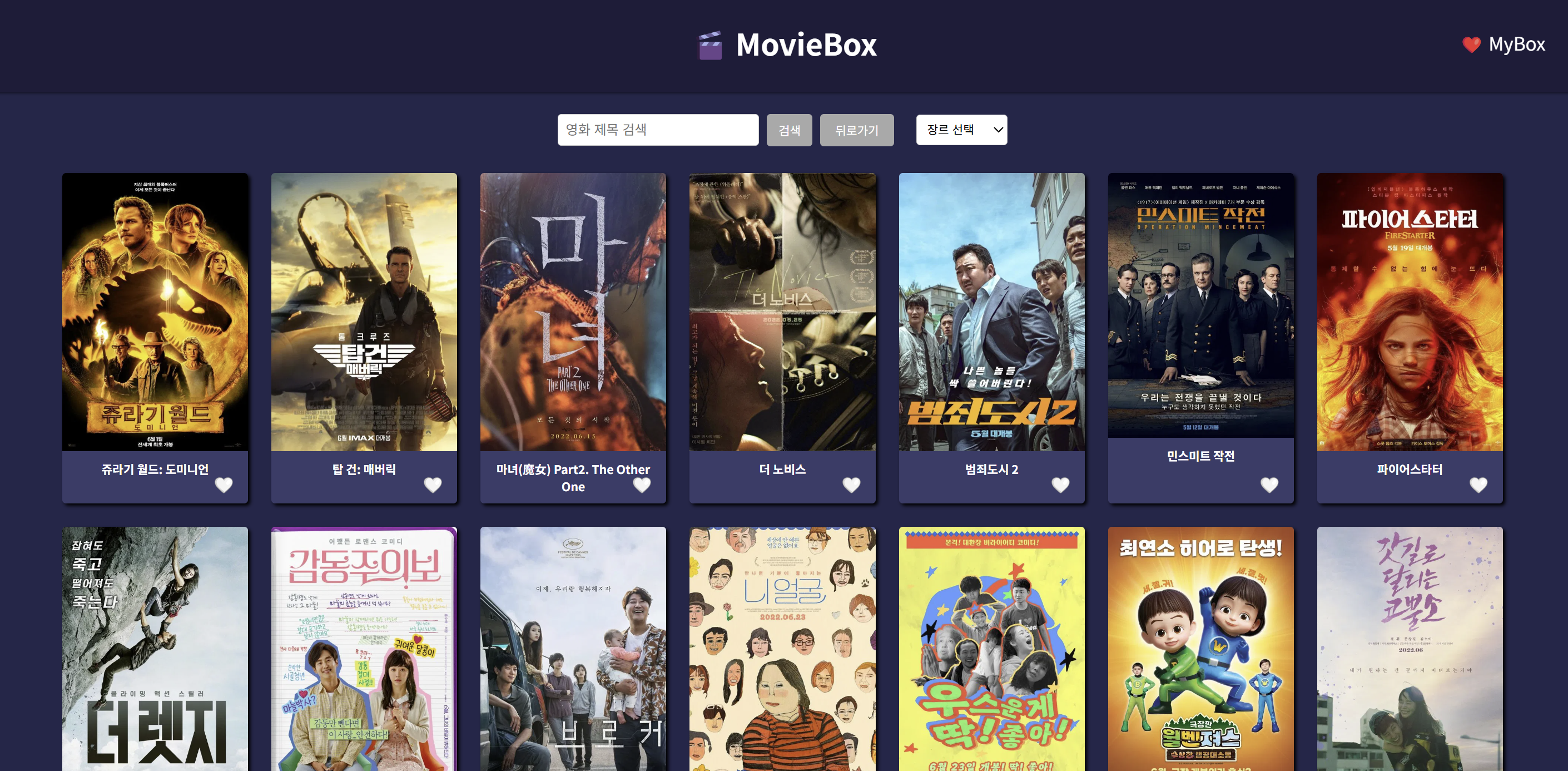
1. 장르별로 모아보기
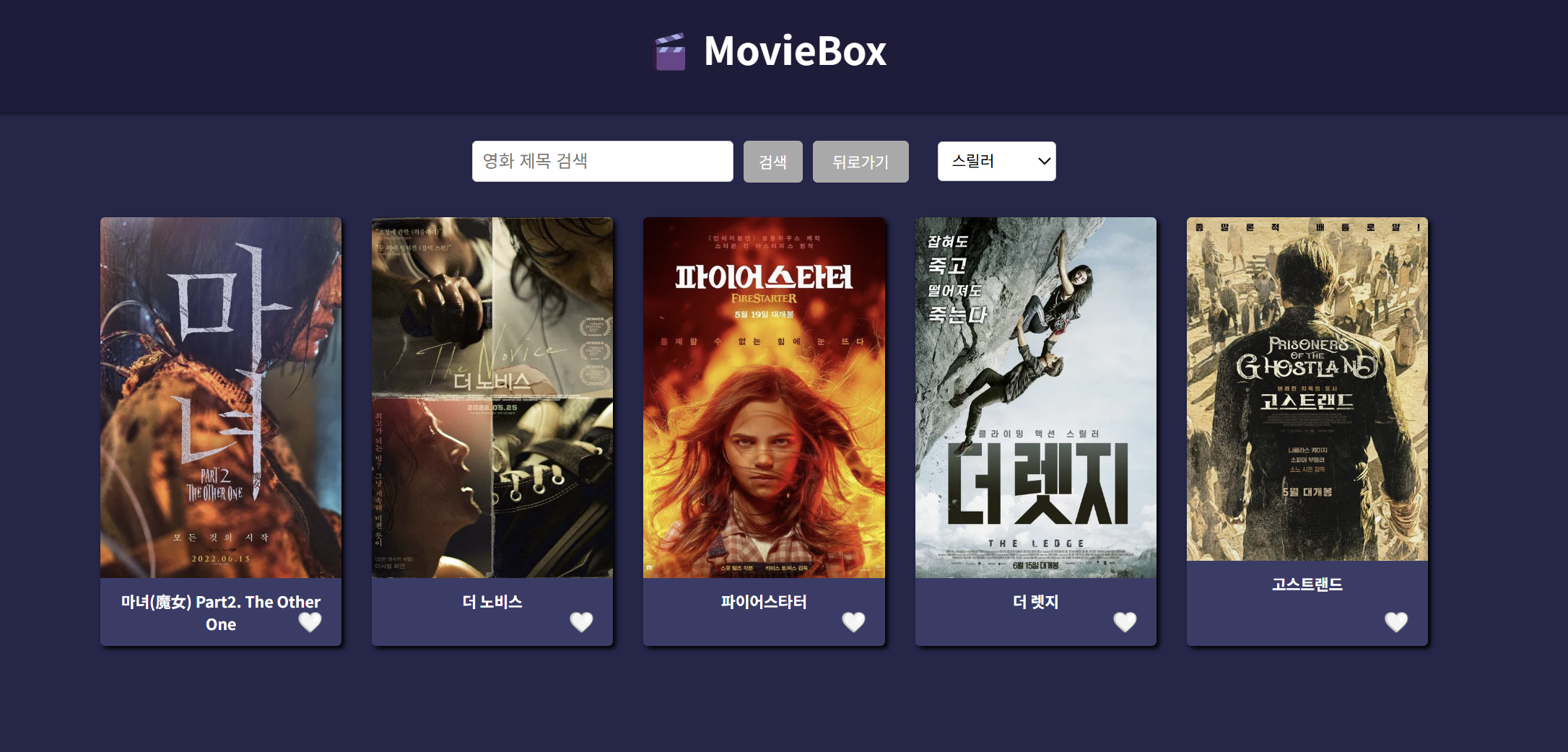
- 드롭다운을 통해 장르별로 영화를 모아볼 수 있도록함
- 사용 기능
- HTML 기본 드롭다운 UI 구성
- genreMap.js에 장르별 아이디 구분
- usestate로 영화 장르 상태값 관리
- filter()로 영화 장르 기준으로 필터링
const handleGenreChange = (e) => {
  const genreId = e.target.value;
  setSelectedGenre(genreId);

  if (genreId === '') {
    setFilteredMovies(dummy.results); // 전체 목록
  } else {
    const filtered = dummy.results.filter((movie) =>
      movie.genre_ids.includes(Number(genreId))
    );
    setFilteredMovies(filtered);
  }
};
// genreMap.js
export const genreMap = {
28: "액션",
12: "모험",
16: "애니메이션",
35: "코미디",
80: "범죄",
99: "다큐멘터리",
18: "드라마",
10751: "가족",
14: "판타지",
36: "역사",
27: "공포",
10402: "음악",
9648: "미스터리",
10749: "로맨스",
878: "SF",
10770: "TV 영화",
53: "스릴러",
10752: "전쟁",
37: "서부",
};
2. 영화 상세 페이지
- 카드 클릭 시 영화 상세 정보 페이지로 이동. 포스터, 제목, 줄거리, 개봉일, 평점을 표시함
- 설명이 길어지면 스크롤 기능
- 뒤로가기 버튼을 누를시 홈화면으로 복귀
- 사용 기술
- useParams: URL 파라미터로 영화 ID 가져오기
- dummy.results.find()로 해당 영화 데이터 필터링
- 조건부 렌더링으로 유효하지 않은 ID 처리 (if (!movie))
- 돌아가기 버튼에 link경로 추가
- CSS overflow-y: auto(텍스트 영역에만)
<Link to="/">
        <button style={{ marginTop: "20px" }}>← 돌아가기</button>
      </Link>
MovieDetail.jsx
import { useParams, Link } from "react-router-dom";
import { dummy } from "../movieDummy";

export default function MovieDetail() {
  const { id } = useParams();
  const movie = dummy.results.find((m) => m.id === Number(id));

  if (!movie) {
    return (
      <div style={{ color: "white", padding: "20px" }}>
        <h2>영화를 찾을 수 없습니다 😢</h2>
        <Link to="/">
          <button style={{ marginTop: "20px" }}>← 돌아가기</button>
        </Link>
      </div>
    );
  }

  return (
    <div style={{ color: "white", padding: "20px" }}>
      <h2>{movie.title}</h2>
      <img
        src={`https://image.tmdb.org/t/p/w500${movie.poster_path}`}
        alt={movie.title}
        style={{ width: "300px", borderRadius: "8px" }}
      />
      <p><strong>줄거리:</strong> {movie.overview}</p>
      <p><strong>개봉일:</strong> {movie.release_date}</p>
      <p><strong>평점:</strong> {movie.vote_average}</p>
      <Link to="/">
        <button style={{ marginTop: "20px" }}>← 돌아가기</button>
      </Link>
    </div>
  );
}

3. 찜(하트) 추가 (MyBox에서 모아보기)
- 각 영화 카드에 🤍 버튼을 눌러 찜 추가/해제 가능
- 사용 기술
- useState, useContext, createContext: 전역 상태 myBox 관리
- Array.prototype.some(): 찜 여부 판별
- 조건부 렌더링 (isSaved ? '❤️' : '🤍')
- 발생한 문제 - 클릭 이벤트 전파로 인해 하트를 눌렀을 때 상세 페이지로도 같이 이동됨
- onClick={(e) => e.stopPropagation()} 으로 클릭 이벤트 차단
4. MyBox 페이지 구현
- 찜한 영화만 따로 모아 보여주는 /mybox 페이지 구현
- 찜 목록이 비어 있을 때는 메시지 출력
- 헤더 우측에 ❤️ MyBox 버튼(링크) 추가
- 홈으로 돌아가는 버튼 구현
- 사용 기술
- <Link to="/mybox">
- react-router-dom의 Route로 별도 페이지 구성
- 조건부 렌더링 (myBox.length === 0)
- CSS flex 정렬, textAlign 등으로 안내 문구 중앙 배치
import { useMyBox } from "../context/MyBoxContext";
import MovieCard  from "../MovieCard";
import './MyBox.css'
import { Link } from "react-router-dom";

function MyBox() {
  const {myBox}=useMyBox();

  return (
    <div>
      <h2 style={{ color: "white", marginTop: "30px", textAlign: "center" }}>나의 찜 목록</h2>

      <div style={{ padding: "20px", textAlign: "center" }}>
        <Link
          to="/"
          style={{
            color: "white",
            textDecoration: "none",
            fontSize: "18px",
            border: "1px solid white",
            padding: "8px 12px",
            borderRadius: "5px",
          }}
        >
          ← 홈으로
        </Link>
      </div>

      <div className="mybox-container">
        {myBox.length === 0 ? (
          <p
            style={{
              color: "white",
              fontSize: "25px",
              textAlign: "center",
              marginTop: "100px",
            }}
          >
            찜한 영화가 없습니다.
          </p>
        ) : (
          <div className="app-container">
            {myBox.map((movie) => (
              <MovieCard key={movie.id} movie={movie} />
            ))}
          </div>
        )}
      </div>
    </div>
  );
}

export default MyBox;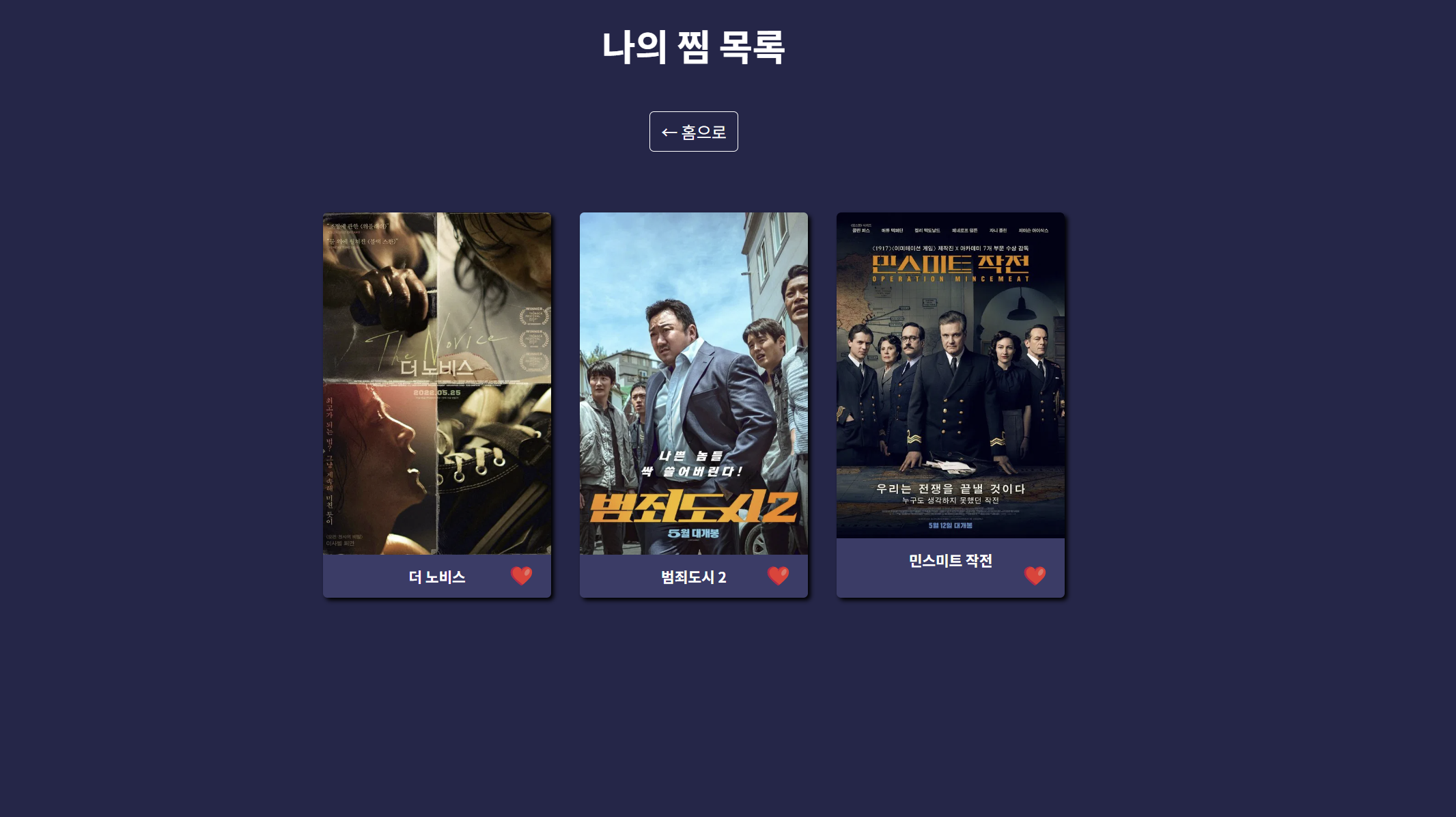
5. 뒤로가기 경로 분기 로직 구현
- 홈에서 상세 페이지로 들어온 경우 → 홈으로 돌아가야 함
- MyBox에서 들어온 경우 → 다시 MyBox로 돌아가야 함
- 발생한 문제
- 상세페이지에서 돌아가기를 눌러도 항상 MyBox로 돌아가는 현상 발생
- 모든 카드가 state={{ from: 'mybox' }}를 가지는 문제
- 해결
- useLocation()으로 현재 경로 확인
- 경로가 /mybox일 때만 state={{ from: 'mybox' }} 전달하도록 조건 분기
const location = useLocation();
const isFromMyBox = location.pathname === "/mybox";
<Link to={`/movie/${movie.id}`} state={isFromMyBox ? { from: 'mybox' } : undefined} />
6. 상세 페이지 하단에 대여하기 버튼 추가
- 영화 상세페이지 맨 아래에 "대여하기" 버튼 추가
- 사용 기능
- MovieDetail.jsx에 <button className="rent-button">대여하기</button> 추가
현재까지의 코드
Header.jsx
import { Link } from "react-router-dom";

function Header() {
  return (
    <header className="site-header">
    <h1 className="logo">🎬 MovieBox</h1>
    <nav style={{
      position: 'absolute',
      right: '40px'
      }}>
        <Link to="/mybox"
        style={{
          color: 'white',
          textDecoration: 'none',
          fontSize: '25px' }}>
          ❤️ MyBox
        </Link>
      </nav>
  </header>
  );
}

export default Header;
MovieList.jsx
import React from 'react';
import MovieCard from '../MovieCard';
import '../index.css'

function MovieList({movies}) {
  return (
    <div className="app-container">
        {movies.map((movie) => (
          <MovieCard
          key={movie.id}
          movie={{
            id: movie.id,
            title: movie.title,
            posterUrl: `https://image.tmdb.org/t/p/w500/${movie.poster_path}`,
            vote_average: movie.vote_average
          }}
        />
        ))}
      </div>
  );
}

export default MovieList;
SearchBar.jsx
import React from 'react';
import { genreMap } from '../genreMap';
import '../index.css'

function SearchBar({search,onSearchChange,onKeyDown,onSearch,onReset,selectedGenre,onGenreChange}) {
  return (
    <div className="search-container">
        <input
          type="text"
          placeholder="영화 제목 검색"
          value={search}
          onChange={onSearchChange}
          onKeyDown={onKeyDown}
        />
        <button onClick={onSearch}>검색</button>
        <button className="reset-button" onClick={onReset}>뒤로가기</button>

        <select
          className="genre-dropdown"
          value={selectedGenre}
          onChange={onGenreChange}
        >
          <option value="">장르 선택</option>
          {Object.entries(genreMap).map(([id, name]) => (
            <option key={id} value={id}>
              {name}
            </option>
          ))}
        </select>
      </div>
  );
}

export default SearchBar;
MyBoxContext.jsx
import { createContext, useContext, useState } from "react";

const MyBoxContext = createContext();

export function MyBoxProvider({ children }) {
  const [myBox, setMyBox] = useState([]);

  const toggleMovie = (movie) => {
    setMyBox((prev) => {
      const exists = prev.find((m) => m.id === movie.id);
      return exists ? prev.filter((m) => m.id !== movie.id) : [...prev, movie];
    });
  };

  return (
    <MyBoxContext.Provider value={{ myBox, toggleMovie }}>
      {children}
    </MyBoxContext.Provider>
  );
}

export function useMyBox() {
  return useContext(MyBoxContext);
}
MovieDetail.jsx
import { useParams, Link, useLocation  } from "react-router-dom";
import { dummy } from "../movieDummy";


export default function MovieDetail() {
  const { id } = useParams();
  const movie = dummy.results.find((m) => m.id === Number(id));
  const location = useLocation();
  const from = location.state?.from;

  if (!movie) {
    return (
      <div style={{ color: "white", padding: "20px" }}>
        <h2>영화를 찾을 수 없습니다</h2>
        <Link to="/">
          <button style={{ marginTop: "20px" }}>← 돌아가기</button>
        </Link>
      </div>
    );
  }

  return (
    <div className="detail-container">
      <div className="detail-card">
        <img
          className="detail-poster"
          src={`https://image.tmdb.org/t/p/w500${movie.poster_path}`}
          alt={movie.title}
        />
        <div className="detail-info">
          <h2>{movie.title}</h2>
          <p><strong>줄거리</strong><br />{movie.overview}</p>
          <p><strong>개봉일:</strong> {movie.release_date}</p>
          <p><strong>평점:</strong> {movie.vote_average}</p>
          <button className="rent-button">대여하기</button>
          <br></br>
          <Link to={from === "mybox" ? "/mybox" : "/"} className="back-button">
            ← 돌아가기
          </Link>
        </div>
      </div>
    </div>
  );
}
MyBox.jsx
import { useMyBox } from "../context/MyBoxContext";
import MovieCard  from "../MovieCard";
import './MyBox.css'
import { Link } from "react-router-dom";

function MyBox() {
  const {myBox}=useMyBox();

  return (
    <div>
      <h2 style={{ color: "white", marginTop: "30px", textAlign: "center" }}>나의 찜 목록</h2>

      <div style={{ padding: "20px", textAlign: "center" }}>
        <Link
          to="/"
          style={{
            color: "white",
            textDecoration: "none",
            fontSize: "18px",
            border: "1px solid white",
            padding: "8px 12px",
            borderRadius: "5px",
          }}
        >
          ← 홈으로
        </Link>
      </div>

      <div className="mybox-container">
        {myBox.length === 0 ? (
          <p
            style={{
              color: "white",
              fontSize: "25px",
              textAlign: "center",
              marginTop: "100px",
            }}
          >
            찜한 영화가 없습니다.
          </p>
        ) : (
          <div className="app-container">
            {myBox.map((movie) => (
              <MovieCard key={movie.id} movie={movie} />
            ))}
          </div>
        )}
      </div>
    </div>
  );
}

export default MyBox;
App.jsx
import { useState } from "react";
import { dummy } from "./movieDummy";
import Header from "./components/Header";
import SearchBar from "./components/SearchBar";
import MovieList from "./components/MovieList";


function App() {
  const [search, setSearch] = useState("");
  const [filteredMovies, setFilteredMovies] = useState(dummy.results);
  const [selectedGenre, setSelectedGenre] = useState("");

  const handleSearch = () => {
    const newMovies = dummy.results.filter((item) =>
      item.title.toLowerCase().includes(search.toLowerCase())
    );
    setFilteredMovies(newMovies);
  };

  const handleKeyDown = (e) => {
    if (e.key === "Enter") handleSearch();
  };

  const handleReset = () => {
    setSearch("");
    setFilteredMovies(dummy.results);
  };

  const handleGenreChange=(e)=>{
    const genreId=e.target.value;
    setSelectedGenre(genreId);

    if(genreId===''){
      setFilteredMovies(dummy.results);
    }else{
      const filtered=dummy.results.filter((movie)=>
      movie.genre_ids.includes(Number(genreId)));
      setFilteredMovies(filtered);
    }
  }
  return (
    <>
     <Header/>
     <SearchBar
      search={search}
      onSearchChange={(e)=>setSearch(e.target.value)}
      onSearch={handleSearch}
      onReset={handleReset}
      selectedGenre={selectedGenre}
      onGenreChange={handleGenreChange}
      onKeyDown={handleKeyDown}
     />
     <MovieList movies={filteredMovies}/>
    </>
  );
}

export default App;
MovieCard.jsx
import { useMyBox } from './context/MyBoxContext';
import { useLocation,Link } from 'react-router-dom';
import './MovieCard.css';

function MovieCard({ movie }) {
  const { myBox, toggleMovie } = useMyBox();
  const isSaved = myBox.some(m => m.id === movie.id);
  const location = useLocation();
  const isFromMyBox = location.pathname === "/mybox";

  return (
    <div className="movie-container">
  <Link
    to={`/movie/${movie.id}`}
    state={isFromMyBox ? { from: 'mybox' } : undefined}
    className="movie-link"
  >
    <img src={movie.posterUrl} alt={movie.title} />
    <h3>{movie.title}</h3>
  </Link>
  <button
  className="heart-button"
  onClick={(e) => {
    e.stopPropagation();
    toggleMovie(movie);
  }}>
    {isSaved ? '❤️' : '🤍'}
  </button>
</div>
  );
}

export default MovieCard;
main.jsx
import React from "react";
import ReactDOM from "react-dom/client";
import App from "./App.jsx";
import { BrowserRouter, Routes, Route } from "react-router-dom";
import MovieDetail from "./pages/MovieDetail.jsx";
import { MyBoxProvider } from "./context/MyBoxContext.jsx";
import MyBox from './pages/MyBox';

ReactDOM.createRoot(document.getElementById("root")).render(
  <BrowserRouter>
    <MyBoxProvider>
      <Routes>
        <Route path="/" element={<App />} />
        <Route path="/movie/:id" element={<MovieDetail />} />
        <Route path="/mybox" element={<MyBox />} />
      </Routes>
    </MyBoxProvider>
  </BrowserRouter>
);'프론트엔드' 카테고리의 다른 글
| [React] 영화 목록 웹사이트 만들기 + 검색 기능 구현 (1) | 2025.04.27 |
|---|---|
| [React] 린캔버스 프로젝트 (0) | 2025.04.06 |
| [React]React 완벽 마스터: 기초 개념부터 린캔버스 프로젝트까지 ② (0) | 2025.03.31 |
| [React]React 완벽 마스터: 기초 개념부터 린캔버스 프로젝트까지 ① (0) | 2025.03.22 |
| [HTML, CSS] 네이버 클론코딩 ② (0) | 2025.02.18 |